
Table of Contents
Is ranking #1 on Google enough in 2025? Surprisingly, the answer is often no.
You can have the top spot, but if your competitor below you takes up twice as much screen space with rich snippets, they might still steal your click. In the age of “Zero-Click” searches, SEO is no longer just about ranking—it’s about dominating pixel space.
That is why I built the FAQ Schema Generator.
It is a simple, free tool designed to help Indie Hackers and SEO pros add “Question & Answer” rich snippets to their search results, instantly increasing visibility and Click-Through Rate (CTR).
The Problem: Why Most Schema Tools Suck
If you are running a WordPress site or a custom build, adding Schema markup usually involves one of two headaches:
- Bloated Plugins: You install a “All-in-One SEO” plugin that slows down your site with unnecessary JavaScript just to add a few lines of code.
- Complex Forms: You use a generic generator that asks for 20 different fields (Latitude? Longitude?) when all you want to do is add a simple Q&A.
I realized this while building my Local Business Schema Generator. Local SEO requires complexity, but FAQ Schema should be simple. It’s just a question, and an answer.
So, I decided to build a standalone tool that does one thing perfectly.
Introducing the FAQ Schema Generator
This new tool is part of the PSEO Toolbox. It is stripped down to the essentials, focusing on privacy, speed, and usability.
Key Features:
- Dark Mode Native: Because we are developers, and white screens hurt our eyes. The interface matches the rest of the toolbox with a sleek glassmorphism design.
- Privacy-Focused: The tool runs entirely in your browser using JavaScript. No data is sent to my server.
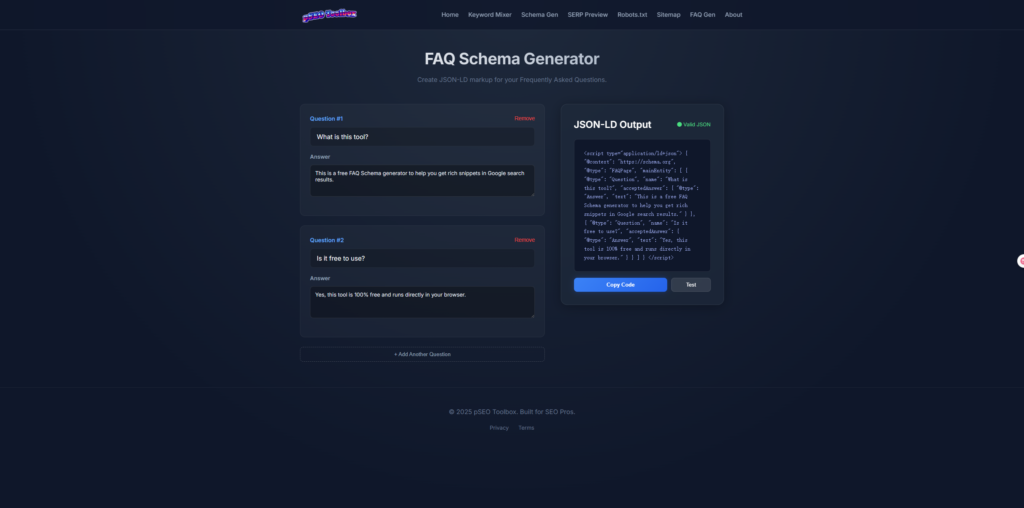
- Instant JSON-LD: As you type, the valid Schema code is generated in real-time. No “Submit” buttons, no waiting.
- Validation Ready: Includes a one-click link to Google’s Rich Results Test to verify your code immediately.
Tutorial: How to Get Rich Snippets in 3 Steps
Adding FAQ Schema to your pages is one of the quickest “wins” in SEO. Here is how to use the FAQ Schema Generator to do it in under a minute:
Step 1: Open the Tool
Navigate to the FAQ Schema Generator. You will see a clean interface ready for your input.
Step 2: Add Your Questions
Think of the top 3-4 questions users ask about your specific page topic.
- Example Q: Is this tool free?
- Example A: Yes, it is 100% free for unlimited use.
Click “+ Add Another Question” to add as many as you need.
Step 3: Copy and Paste
Look at the JSON-LD Output panel on the right. Click the blue “Copy Code” button.
Now, simply paste this code snippet into the <head> or <body> section of your website’s HTML. If you are using WordPress, you can use a “Custom HTML” block or a header/footer script plugin.
Why This Matters for Programmatic SEO
If you are doing Programmatic SEO (pSEO), you are likely generating hundreds or thousands of pages.
Imagine if every single one of those pages had an FAQ section in the search results. You would effectively double your footprint on Google. This tool makes it easy to generate the template code you need to scale that strategy.
Try It Now
Don’t let your competitors take up all the space. Go grab your snippets.